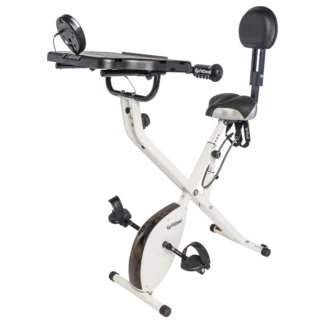
 FitDesk 3.0 Desk Exercise Bike Review: Exercise Bike and Office Workstation in One
Let’s face it—most of us spend way too many hours glued to our desks. But what if you could squeeze in some exercise without missing a beat at work? Meet the FitDesk 3.0 Desk Exercise Bike: a clever, space-saving solution that lets you pedal, type, and power through your to-do list all at once. If you’re trying to beat a sedentary lifestyle or want to add a little movement to your day, this bike desk might be precisely what you need.
Why the FitDesk 3.0 Stands Out
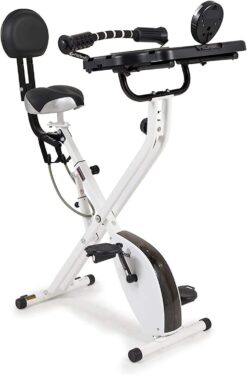
The FitDesk 3.0 is more than just a stationary bike with a tray slapped on top. Engineers designed it with real-world comfort and usability in mind, featuring a wide 16” x 19” non-slip desk surface—plenty of room for your laptop, notebook, or even a tablet. The beach cruiser-style seat features an adjustable backrest and forearm massage rollers, allowing you to sit comfortably for hours, whether you’re working on a big project or simply catching up on emails.
Key Features at a Glance
- Fits Most Users: Designed for anyone from 4’10” to 6’6” tall with a 300-pound weight limit, making it accessible for a wide range of body types.
- Built for Comfort: The plush seat, adjustable backrest, and padded armrests keep you supported, even during long sessions.
- Easy to Store: The quick-lock folding frame allows you to tuck it away when you’re done, making it perfect for home offices or smaller spaces.
- Customizable Workout: Adjustable resistance lets you switch up the intensity, whether you’re looking for a light pedal or a more challenging ride.
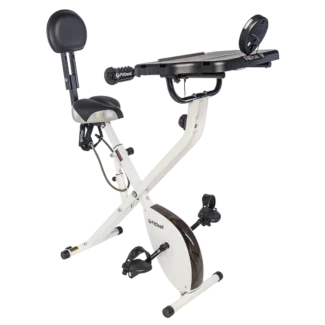
The FitDesk 3.0 makes it simple to stay active, even with a packed schedule. It’s a practical and surprisingly comfortable way to sneak in movement, improve circulation, and burn a few extra calories—all without sacrificing productivity. If you’re looking to invest in your health without sacrificing your work, this bike desk is worth considering.
Learn more in my complete review below!
Product: FitDesk 3.0 Desk Exercise Bike
Price: For a great deal on this desk/bike, merely go here on Amazon
Warranty: 1 Year Limited
My rating: 8.5/10
Affiliate Disclosure: As an Amazon Affiliate Program participant, I earn commissions on purchases made through links in this post. Full disclosure
Details and Specifications
- Dimensions: 28″ L x 16″ W x 45″ H
- Supports 300 pounds (136 kg) maximum user weight
- Storage kit
- Non-slip adjustable desk with dimensions of 16 x 19 inches
- Adjustable armrest with padded and contoured massage rollers
- Weight: 47 pounds (21 kg)
- Adjustable semi-recumbent seat
- Resistance: Manual magnetic resistance with eight levels
- Drive: Belt
- Fitness Monitor: displays mileage, time, and calories
- Compact Folding Design
- Transport wheels
- Built-in tablet holder
- 1 Year limited
Everything You Need to Know About the Frame Construction of the FitDesk 3.0
If you’re searching for a blend of productivity and exercise, the FitDesk 3.0 Desk Exercise Bike is tough to beat. But before you commit, it’s smart to dig into what really matters for long-term comfort and safety: the frame construction. Let’s break down exactly how FitDesk designed the 3.0 and why that matters.
Solid Steel for Lasting Durability
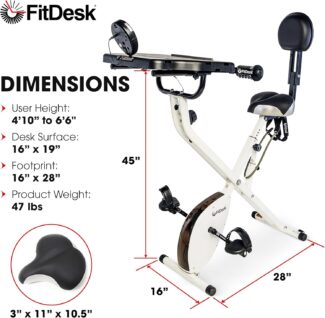
The heart of the FitDesk 3.0 is its steel frame. This heavy-duty, powder-coated steel construction gives the bike its reputation for sturdiness and longevity, supporting users up to 300 pounds without feeling wobbly or flimsy. The powder coating isn’t just for looks—it helps prevent corrosion and keeps the bike looking sharp, even if you use it every day or move it around the house (which is a breeze, thanks to the folding design).
Smart, Space-Saving Folding X-Frame
The FitDesk 3.0 uses an “X” frame design, which is popular for home fitness gear because it’s both stable and easy to fold up for storage. The quick-lock folding frame lets you collapse the bike when you need extra space—no tools required. Therefore, it’s perfect for apartments, dorms, or anyone who doesn’t want a permanent exercise bike taking up precious real estate.
Thoughtful Design for Everyday Use
While the frame is mostly steel, there are some thoughtful touches throughout. The main load-bearing parts (like the stabilizers and seat post) are all metal, which boosts strength. The only plastic you’ll really notice is on the desk platform itself, so you don’t have to worry about the critical parts wearing out or snapping over time. The assembly instructions even highlight the quick-release frame unlock for safe and straightforward setup.
Stable Ride, No Matter the Workout
One of the most common complaints with compact exercise bikes is that they can feel unstable—especially if you stand up or pedal hard. With the FitDesk 3.0’s sturdy steel X-frame and wide stabilizers, you get a smooth, balanced ride whether you’re typing away on your laptop or going for a calorie-burning sprint. Users consistently praise how solid it feels, even during longer sessions.
Final Thoughts: The FitDesk 3.0 Desk Exercise Bike stands out for its robust steel frame, clever folding X-frame design, and thoughtful touches that make it easy to live with. If you want a desk bike that can handle real-world use—without taking over your living room—this model’s construction is about as good as it gets in its price range.
What You Need to Know About the FitDesk 3.0 Desk Exercise Bike Seat and Pedals
If you’re looking to incorporate more movement into your workday, the FitDesk 3.0 Desk Exercise Bike is a top choice available. But let’s be real — if the seat is uncomfortable or the pedals are clunky, it’s going to sit in the corner gathering dust. Here’s what you need to know about the seat and pedals on the FitDesk 3.0, so you can decide if it’s the right fit for your home or office.
A Closer Look at the FitDesk 3.0 Seat
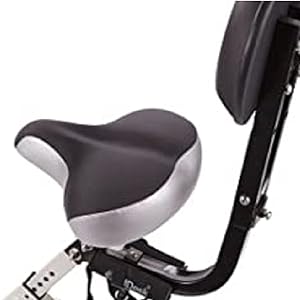
One of the first things you’ll notice about the FitDesk 3.0 is its “beach cruiser”-style seat. Translation: it’s broader and better padded than most upright exercise bikes, making it much friendlier for longer work sessions. The seat itself is 10.5 inches wide, which gives decent support whether you’re working in 30-minute bursts or putting in a couple of hours at the desk.
For those who’ve struggled with uncomfortable bike seats in the past, the FitDesk 3.0 adds a little extra: an adjustable backrest. Engineers designed the backrest to give you semi-recumbent support, letting you lean back slightly and take pressure off your lower back. Both the seat and the backrest are adjustable to fit users from 4’10” to 6’6”, which means it works for most body types.
Adjusting the seat is a quick process: unscrew the knob located under the seat, adjust it to the desired height, and then lock it back in place. Therefore, it’s easy for multiple people to share the bike throughout the day.
FitDesk 3.0 Pedals: Smooth, Quiet, and Office-Friendly
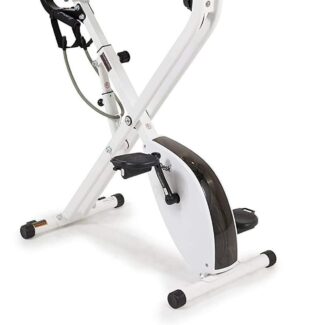
The FitDesk 3.0 uses traditional bike pedals with a magnetic resistance system, which keeps things super quiet — a must if you’re trying to focus or take calls while pedaling. The magnetic resistance is adjustable, so you can start easy and dial it up if you want a challenge.
The pedal action is smooth and doesn’t rock the desk, so you can type or use your laptop without your coffee sloshing everywhere. While the pedals don’t come with toe cages, they’re wide enough and have enough grip for most shoes — slip on some sneakers and you’re good to go.
How Does It Feel to Ride?
Users consistently report that the FitDesk 3.0 is sturdy and doesn’t wobble, even when you’re pedaling at a faster pace. The seat comfort is above average for an exercise bike, and the adjustability means you’re less likely to get sore during longer sessions. Some people may still want to add a gel seat cover for extra padding, especially if you plan to use it for hours at a time.
The bottom line: if you’re searching for a desk bike that won’t torture your backside and will keep your feet moving comfortably while you work, the FitDesk 3.0’s seat and pedals are a big part of why it’s so popular. With easy adjustments and a focus on comfort, FitDesk built it for real-world, daily use — not just for show.
Thinking of giving it a try? Make sure you measure your space and check the height adjustments to get the best fit, and you’ll be on your way to a more active (and more comfortable) workday.
A Deep Dive into the Desk and Massage Rollers on the FitDesk 3.0 Desk Exercise Bike
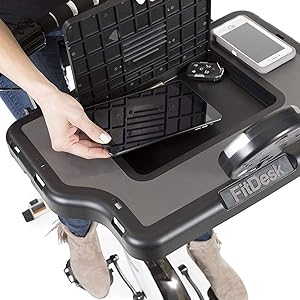
If you’re hunting for a way to sneak in more movement without sacrificing your productivity, the FitDesk 3.0 Desk Exercise Bike is probably on your radar. One of the reasons it stands out is the thoughtful design of its desk surface and the addition of built-in massage rollers. Here’s what you need to know if you’re considering making this your new office companion.
A Desk That’s Actually Built for Work
The FitDesk 3.0 isn’t just an exercise bike with a tray slapped on top. The desk is a 16” x 19” non-slip surface, which gives you enough space for a laptop, tablet, or even a notebook and a cup of coffee. There’s a built-in tablet holder that props up your device at just the right angle, and underneath, you’ll find a small storage compartment for your pens, charging cables, or snacks.
The desk platform is adjustable, so you can slide it closer or farther from you to fit your arms comfortably, whether you’re typing, reading, or just scrolling through emails. The steel frame folds up for easy storage when you’re not using it, making it a good fit even for smaller spaces.
Built-In Massage Rollers: Small Feature, Big Difference
One of the most unique and popular features on the FitDesk 3.0 is the pair of massage rollers built directly into the front edge of the desk. Engineers designed these contoured, padded rollers to support your arms and wrists while you work, reducing fatigue and encouraging a more relaxed position.
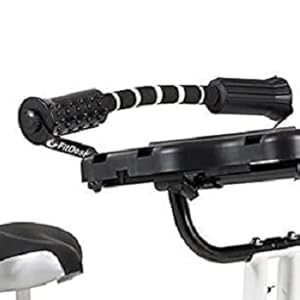
If you find yourself hunching over your desk or feeling tension in your forearms after hours at the keyboard, these rollers can make a surprising difference. Users can rest their arms on the rollers as they type, read, or scroll, and even roll their forearms gently over them for a little on-the-go massage. It’s a simple way to break up repetitive desk work and keep your upper body feeling good throughout the day.
Why These Features Matter
The combination of a stable, adjustable desk and massage rollers means you’re not just burning calories—you’re able to work comfortably for extended periods. It’s the kind of detail that turns a “nice idea” into something you’ll actually use every day. Plus, the FitDesk 3.0’s design means you’re less likely to end up with sore wrists or tense shoulders, which is a common complaint with other bike desks.
If you’re after a way to stay active without shortchanging your work, the FitDesk 3.0’s desk and massage rollers are more than a gimmick—they’re what make this bike practical for real work and real people.
Ready to give it a spin? Your body (and your inbox) will thank you.
FitDesk 3.0 Desk Exercise Bike: Understanding the Drive and Resistance Systems
Suppose you’re considering the FitDesk 3.0 Desk Exercise Bike as your solution for staying active while working. In that case, you probably want to know how it actually feels to pedal during a long Zoom call or while answering emails. The secret to a smooth, quiet ride comes down to two main features: the drive system and the resistance mechanism. Let’s break down exactly what makes the FitDesk 3.0 tick—and why these details matter for your daily use.
Drive System: Belt-Driven for a Smoother, Quieter Ride
At the heart of the FitDesk 3.0 is a belt-driven system. Unlike older chain-driven exercise bikes, a belt drive uses a reinforced rubber or synthetic belt to connect the pedals and the flywheel. The upshot? You get a steady, consistent pedaling motion without the clanking or maintenance headaches of a chain.
Belt drives are also known for running much quieter, which is essential if you’re working from home or in a shared space—no one wants to hear the squeak of your workout during a conference call.
Resistance System: Magnetic Resistance for Effortless Adjustments
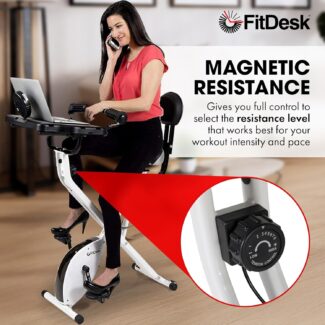
The FitDesk 3.0 uses a magnetic resistance system—a favorite in the world of stationary bikes for good reason. Magnets inside the bike move closer or farther from the flywheel as you turn the resistance knob, making it harder or easier to pedal.
The 3.0 is nearly silent and delivers a smooth, jerk-free feel. Adjusting resistance is seamless, so you can ramp up the challenge when you want a quick workout or dial it down for a gentle spin while typing away.
Why These Features Matter
- Low Noise: Both the belt drive and magnetic resistance help keep noise to a minimum—ideal for home offices or apartment living.
- Low Maintenance: Belt drives don’t require oiling or tightening like chains, and magnetic resistance eliminates the wear and tear of brake pads.
- Smooth Operation: The combination gives you a steady ride so that you can focus on your work and not on a jerky, distracting pedal stroke.
The Bottom Line: The FitDesk 3.0 Desk Exercise Bike stands out for its thoughtful engineering. The belt drive and magnetic resistance work together to deliver a quiet, reliable, and user-friendly experience. If you’re shopping for an exercise bike to use during the workday, these features make a real difference in both comfort and convenience.
Want to maximize productivity while achieving your fitness goals? FitDesk designed the 3.0’s drive and resistance systems to keep your ride as smooth as your workflow.
Everything You Need to Know About the FitDesk 3.0 Desk Exercise Bike Fitness Monitor
If you’re considering purchasing a FitDesk 3.0 Desk Exercise Bike, you’re likely curious about the fitness monitor. Can it actually help you track your workouts, or is it just another flashy add-on? Let’s break it down, no nonsense—just the facts.
What Does the FitDesk 3.0 Fitness Monitor Track?
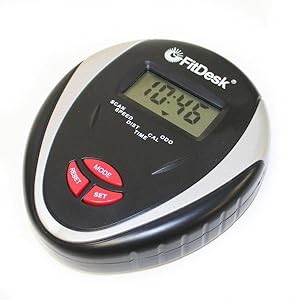
The FitDesk 3.0 comes with an easy-to-read digital performance meter right at the top of your desk. The screen isn’t just for show—it tracks three of the most important stats for anyone trying to get a little fitter while working: your mileage, calories burned, and total time spent cycling. All your key info is visible at a glance, so you never have to guess how long you’ve been pedaling or if you’re actually making progress.
How Easy Is It to Use?
One of the best things about the FitDesk 3.0’s fitness monitor is its simplicity. There’s no clunky app to set up, no confusing Bluetooth pairing, and no need to download anything to your phone. You start pedaling; the monitor automatically begins tracking your stats.
To reset your session statistics, hold down the reset button for a few seconds. It wipes your time, calories, and trip mileage, but keeps your bike’s total odometer reading intact—a nice feature if you’re trying to keep a long-term log.
Is the Fitness Monitor Accurate?
Let’s be real—no desk bike is going to compete with a chest strap heart rate monitor or a high-end smartwatch for absolute accuracy. The FitDesk 3.0’s monitor uses basic sensors to estimate distance and calories based on your pedal speed and resistance. For most users, it’s reliable enough to see trends and stay motivated, but don’t expect the precision of a pro gym bike. Use it as a guide and you’ll get the most out of it.

Why Does This Matter?
Tracking your stats—even with a simple display—can make a huge difference in keeping you engaged and motivated. Seeing your numbers go up (even slowly) is a proven way to stick with your new routine. And because the FitDesk 3.0 monitor is so easy to use, there’s no barrier between you and your goals.
Bottom Line: The FitDesk 3.0 Desk Exercise Bike’s fitness monitor prioritizes practicality. It tracks your mileage, calories, and time, giving you just enough information to make your workouts count—without distracting you from work or turning into another tech headache. For anyone looking to stay active at their desk and actually measure progress, it’s a solid choice.
Ready to get fit while you work? The FitDesk 3.0 makes it easy to see your effort pay off, one pedal at a time.
FitDesk 3.0 Desk Exercise Bike: Assembly & Maintenance Guide
If you’re looking to stay active while working or studying, the FitDesk 3.0 Desk Exercise Bike is a smart pick. It combines a comfortable stationary bike with a sturdy desk platform—so you can pedal, type, and Zoom all at once.
In this guide, I’ll walk you through the assembly process, share pro tips for maintenance, and help you troubleshoot common issues. Whether you just unboxed your FitDesk or want to keep it running smoothly for years, you’ll find everything you need right here.
Easy Assembly: Step-by-Step
First things first: don’t be intimidated by the parts. FitDesk designed the 3.0 to be straightforward, and you can always reference the official manual for detailed diagrams.
Here’s the quick version:
- Unpack and Organize: Lay out all the parts and hardware on a clean, flat surface. You’ll find the main frame, desk surface, stabilizers, pedals, seat, and a small bag of screws and tools.
- Attach the Rear and Front Stabilizers: Start by securing the rear stabilizer to the main frame. Tighten all bolts securely; this is what keeps your bike steady.
- Install the Pedals and Seat: Pedals are marked left and right. Thread them carefully and tighten with a wrench. The seat slides onto the post and locks with a knob—don’t overtighten, but ensure it’s secure.
- Mount the Desk: Place the desk platform over the main frame and fasten it using the provided Allen bolts and washers. Use the Allen wrench that comes in the kit.
- Connect the Monitor: Slide the monitor into its slot, connect the meter wires (take care not to pinch them), and pop in batteries.
- Final Checks: Go over each bolt and knob to ensure everything’s snug. Adjust the seat and desk height to fit your body.
If you prefer visuals, the BILT app offers 3D, step-by-step interactive instructions—super helpful if you’re a visual learner (FitDesk Assembly Instructions).
Maintenance Tips for a Smooth Ride
Like any piece of equipment, your FitDesk 3.0 will serve you best with a bit of regular care:
- Wipe It Down: Sweat, dust, and crumbs happen. Keep the frame, seat, and desk clean with a damp cloth after each use.
- Check Bolts and Knobs: Every few weeks, inspect that all bolts, screws, and nuts are tight. Vibration from pedaling can loosen things over time.
- Inspect Meter Wires: Examine the wires connected to the console. If you notice fraying or damage, please get in touch with FitDesk support for replacement.
- Pedal and Resistance Maintenance: If the pedals develop play or squeak, tighten them or apply a drop of lubricant. The resistance lever should move smoothly between 1 and 8—if not, check for obstructions or debris.
Troubleshooting Common Issues
Even the best exercise bikes can run into minor hiccups. Here’s how to fix the most common problems:
- Noisy Pedals or Frame: Usually caused by loose bolts or dry joints. Tighten everything and, if needed, add a bit of lubricant.
- Console Not Working: Check the battery and meter wires. Make sure connections are secure and the batteries are fresh. If the display is flickering or unresponsive, a wire may be pinched or disconnected.
- The Resistance Won’t Change: Inspect the resistance lever and mechanism for obstructions. Sometimes, resetting the bike by unplugging and reconnecting the console can help.
- Desk or Seat Wobbles: Double-check all adjustment knobs and bolts, and tighten as needed.
Final Thoughts: FitDesk built the 3.0 Desk Exercise Bike for daily use, but a little attention goes a long way. Take your time with assembly—don’t skip the manual or the BILT app if you’re stuck. Wipe down your bike, check for loose parts, and enjoy the freedom of multitasking your way to better health.
Got questions or tips from your own FitDesk experience? Let’s hear them in the comments!
Pros
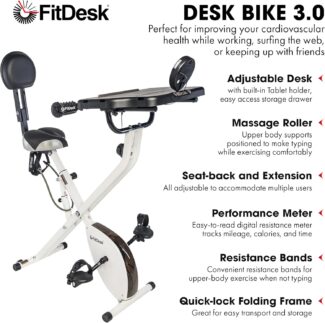
- Frame made of steel, sturdy, durable, and supports users up to 300 pounds.
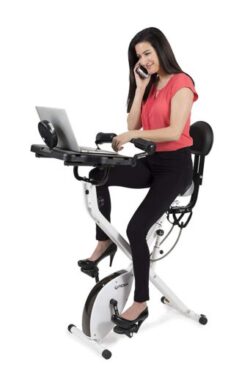
- Multitasking Made Easy: You can pedal while answering emails, streaming shows, or getting through Zoom meetings.
- A dynamic belt drive system provides a quiet and smooth operation.
- A manual magnetic resistance system with eight levels offers a wide range of challenging workouts.
- Resistant bands provide for upper-body cardio.
- Comfortable Desk Surface: The built-in desk is sturdy and roomy enough for a laptop, tablet, or books, and there’s even a little drawer for pens or snacks.
- Compact & Space-Saving: Its foldable design fits nicely in smaller apartments or home offices. When you’re done, fold it up and roll it out of the way.
- Low Impact Exercise: Great for staying active without putting a ton of strain on your joints—perfect for all fitness levels.
- Adjustable Features: Both the seat and desk height are adjustable, making it comfortable for different body types and sitting preferences.
- Pedals feature an anti-skid design and adjustable safety straps to secure the feet in place.
- A fitness monitor that tracks mileage, calories, and time.
Cons
- Not for Intense Workouts: FitDesk built it for light to moderate exercise. Hardcore cyclists might find the resistance lacking.
- Unfortunately, the fitness monitor does not track heart rate and is not Bluetooth compatible.
- Seat Comfort Varies: Some users say the seat can get uncomfortable after long sessions. A seat cushion might help.
- Desk Angle Isn’t Adjustable: The desktop angle does not adjust, so you might find yourself hunching a bit, especially if you’re taller.
FitDesk 3.0 Desk Exercise Bike Review Summary: Exercise Bike and Office Workstation in One
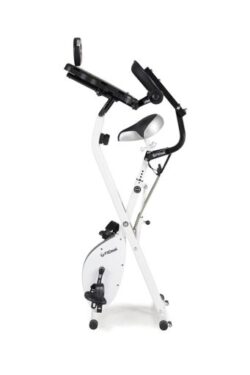
If you’ve ever wished to get fit without sacrificing productivity, the FitDesk 3.0 Desk Exercise Bike might be the solution. This clever piece of equipment combines a lightweight, foldable exercise bike with a sturdy, adjustable desktop—making it easy to pedal away calories. At the same time, you answer emails or binge-watch your favorite shows.
Key Features and Benefits
FitDesk designed the 3.0 with both comfort and practicality in mind. Its adjustable, non-slip 16” x 19” desk surface gives you enough space for a laptop, tablet, or even a notebook. Massage rollers and padded armrests make typing or scrolling more comfortable, while the “beach cruiser” style seat and adjustable backrest help you power through longer sessions without feeling sore or cramped.
The frame is heavy-duty powder-coated steel and supports users up to 300 lbs, accommodating heights from 4’10” to 6’6”. When you’re done, fold it up and stash it away—it’s compact enough for most home or office spaces.
Other features that make it stand out include a fitness monitor to track your progress, resistance adjustment for a varied workout, and a desk strap to keep your devices secure. And let’s be honest: being able to sneak in a workout during your next Zoom meeting is pretty satisfying.
Final Thoughts: Is it perfect? No product is. Some users find the pedaling motion a bit awkward at first, especially when trying to work and ride simultaneously. But overall, if you’re after a way to stay active without ditching your to-do list, the FitDesk 3.0 Desk Exercise Bike is a wise, convenient choice for any home office or workspace.
Ready to mix movement with your daily grind? The FitDesk 3.0 might be just what you need to keep both your body and productivity moving forward.
Important Safety Note:
As with any new exercise program or equipment, it’s essential to consult your physician to ensure the equipment is safe for you to use. It is especially crucial if you have any medical or physical conditions impacting your ability to exercise properly or putting your health at risk. Additionally, if you’re taking medication that affects your heart rate, blood pressure, or cholesterol level, your doctor’s advice is vital to create a workout plan that suits your needs.
Share Your Thoughts and Questions
I hope this in-depth review of the FitDesk 3.0 Desk Exercise Bike was helpful and informative. I encourage you to share your thoughts and questions on the topic. Have you used the FitDesk 3.0 before, or have you had experience with bikes? Your insights can help others make an informed decision. Additionally, I welcome any feedback about my website and suggestions for future content. Your input is invaluable in creating a supportive and informative community.
I look forward to hearing from you and continuing the conversation!
You May Also Like
FlexiSpot Deskcise Pro V9 Desk Bike | All-in-One Workstation
Since the pandemic started, I have been working from home. And thus, I have been spending a lot of time sitting in front of my laptop. This is not very healthy. I have tried to make time to go exercise, but it’s not that easy. So, a good solution would be to exercise while I work. I like that Fitdesk FDX 3.0 has a tablet holder built-in.
Hi Ann, thanks for stopping by and sharing with us. It sounds like you’ve found the perfect solution for yourself. Would you please let me know if I can ever be of assistance? I’m here to help.
Kind regards, Robert
The FitDesk looks like an exciting prospect for an office. Unfortunately, either I would not get any work done, or I would not get any exercise—the compact design is excellent for small offices or spaces. The Cons may not be a deal-breaker; however, these features could move the bike down the list.
Hi Canty, thanks for stopping by. Would you please let me know if I can ever be of assistance? I’m glad to be of help.
Kind regards, Robert